How to Track Brand Mentions in Gemini in Your Own Town
Here's how to track brand mentions in Gemini when you run a local business: ask Gemini the questions your customers ask, with your service and your town in them, and write down which businesses it names. Leave your own name out of the questions. Then ask again another day, because Gemini can name a different set of businesses.
You don't need a tool for this. A Google account and a sheet will do, and one round of questions takes about 20 minutes.
Does Gemini recommend local businesses?
Yes. Ask Gemini for a service in a town and it answers with business names, often with a map at the top. Since December 2025, Gemini can lay out local results as place cards with photos and ratings pulled from Google Maps. Your check is whether your business is one of the names, or one of the pins.
That Maps connection matters before you start. The photos and ratings on a Gemini place card come from the business's Google Maps listing, which is its Google Business Profile. If your profile has old opening hours, that's what a customer sees in Gemini too.
Where do you ask Gemini?
Ask at gemini.google.com or in the Gemini app on your phone. Both give you Gemini's answer.
A normal Google search is a different product, even though Google runs both. The AI Overview at the top of a search result builds its own answer, and so does Google's AI Mode, so a check in one doesn't stand in for the others. Yogoo AI gives Gemini and Google AI Overviews separate lines for the same reason. If you want the search side too, see how Google AI Overview tracking works.
What should you ask Gemini?
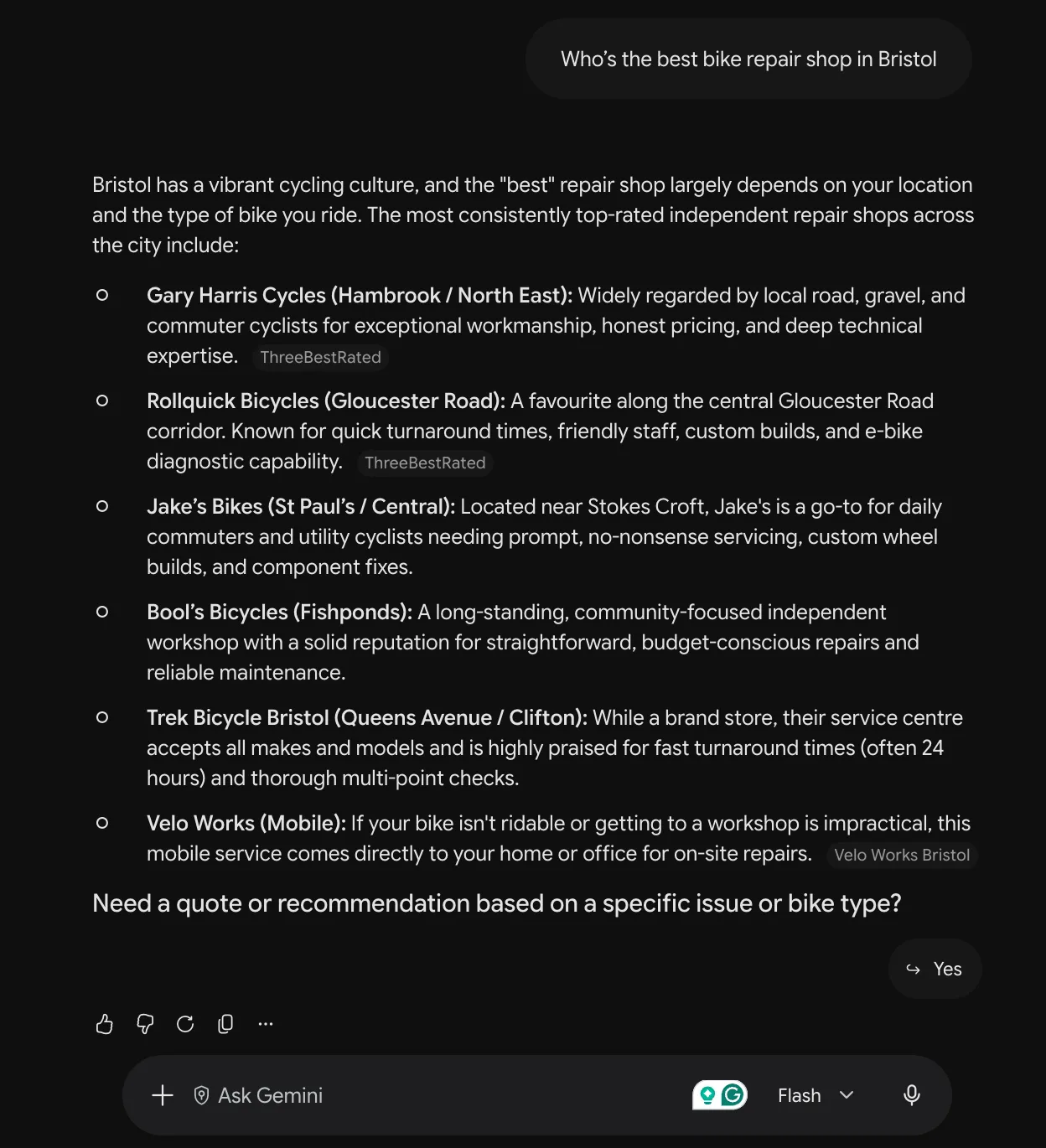
Ask what a customer would type, with your service and your town in every question. Say you run a bike repair shop in Bristol. Questions like these work:
- Who's the best bike repair shop in Bristol?
- Which bike shops in Bristol can fix an e-bike the same day?
- I need my bike serviced in Bristol before Monday. Who should I try?
- Can you recommend a bike mechanic in Bristol who builds wheels?
Keep your shop's name out of them. A customer who's never heard of you can't type your name, so a question with your name in it can't tell you whether Gemini would send them your way.
Skip "near me" as well. What counts as near depends on where you're asking from, and you want the answer someone anywhere in Bristol would get.
How do you keep your own account out of the answer?
Ask in a Temporary Chat. Gemini has a personal context setting, on by default, that lets it learn from your past chats and use them in new answers. If you've spent weeks asking Gemini about your own shop, that history can follow you into the check. Google says Temporary Chats aren't used to personalize Gemini, so they're the cleaner place to ask.
If you've connected your Google Business Profile to Gemini, which Google started offering business owners in June 2026, use a different Google account for the check. An account linked to your profile already knows which business is yours. A customer's doesn't.
What should you look at in Gemini's answer?
Read the whole reply, past the first line. Gemini can name a business in its text, show it as a pin or card on the map, or list its website among the sources in the answer. Note each one separately.
So does Gemini cite businesses it recommends, or only name them? In Yogoo AI's 500-prompt study, run on 10 and 11 August 2026, Gemini, tested as Gemini 2.5 Flash + web search (API), cited at least one source in 96.8% of its 1,740 answers, with an average of 10.4 sources per answer. The study's questions were about AI visibility software, not local services, so read that as how Gemini handles sources in general, not as a number for your town.
Open the sources and see whose sites they are. If the same directory or review site keeps turning up under answers for your town, Gemini read it for those answers, so make sure your business is listed there with the right details. What sources AI engines cite, topic by topic, shows how much those source lists differ from one subject to the next.
How do you log what Gemini says?
Put the date at the top of a sheet, one row per question. For each answer, mark one of these:
- Named: your business is in the text
- Linked: your site is in the sources, but the text doesn't say your name
- Map only: you're a pin or a card, but not in the text or the sources
- Not named: Gemini answered and you weren't anywhere in it
- No answer: Gemini showed an error or the page wouldn't load
Keep "no answer" apart from "not named". If Gemini didn't answer, you don't know what it would have said, so that question can't count against you. Leave it out when you add up.
Add one more column for the businesses Gemini named instead. If the same names keep turning up, those are the businesses you're up against in Gemini.
Then count. Put named and linked together, the way Yogoo AI does, and keep map-only as its own count. A line like "named or linked in 2 of 7 answers" is something you can repeat next week and set beside this one.
Why ask Gemini more than once?
Because Gemini's answer moves. Ask the same question tomorrow and the businesses it names can change, even when nothing about yours did. One round is a snapshot of one day.
Run the same questions on a second day before you change anything, and compare the two dated rounds side by side. Our post on why AI answer engines change their mind about your business goes into what causes it.
If you serve a second town, give it a sheet of its own. The bike shop Gemini names for Bristol can be missing from its answers for Bath.
What if Gemini never names you?
Make sure the engines can read your website first. An engine can't draw on a site it can't read, and a five-minute test shows whether ChatGPT can read your website. Then look at your Business Profile, since that's where the photos and ratings on Gemini's map cards come from. How to improve AI visibility walks through the changes to make on your own site.
How does Yogoo AI track brand mentions in Gemini?
Gemini is one of five engines Yogoo AI can ask: ChatGPT, Claude, Perplexity, Gemini and Google AI Overviews. Not every market runs all five, and your page lists only the ones your market runs. Where Gemini is on that list, Yogoo AI asks it your market's customer questions every day and counts the answers that name your business or link to your site. A market is one service in one place, asked in one language, like "bike repair in Bristol", with a fixed set of about 20 questions. We ask some of them each day, spread out so each question reaches each engine twice a week.
We ask Gemini through Google's developer interface, at the same model the Gemini app uses, with web search on and your market's location set. We treat those answers as what a person would see in the app.
Gemini gets its own line on your page, and its figures carry their counts, like "named or linked in 9 of 160 answers (5.6%)". If Gemini answered and never named or linked you, the line reads 0.0% with its counts, like "0 of 160 answers". That zero is a real measurement. If Gemini doesn't return an answer, we record it as not collected and leave it out of the count, so a missing answer never counts as one that didn't name you.
Gemini's line and the other engines' lines make up your Yogoo Score: the share of all your market's answers that name or link you. It shows from the first answer we collect, marked "Still collecting," until 28 days of answers are in. Yogoo AI corrected how the score is calculated on 3 October 2026, so don't compare a score from before that date with one from after.
If we don't measure your market yet, the page says "We don't measure your market yet" and shows no number. That's about the market, not your business.
In a market we measure, your score with its counts, each engine on its own line and the full rivals table are free once you sign up. So is every question we measure in your market, with its count. Paid plans add more trackers, workflow tools and each engine's latest answer to your market's questions. The score is recalculated every day on every plan, and none of it changes your counts or your score. How Yogoo AI measures AI visibility explains the full method.
If you'd rather not keep the sheet yourself, you can set up a free tracker for your business. In a market we measure, the counts start with the first answer we collect.