Content Workflow: The AI Brand Voice Behind Your Ideas, Calendar, and Posts
Yogoo AI’s AI brand voice tool runs four jobs from one place: content ideas, a content calendar, ready-to-edit post drafts, and the brand profile that ties them together. It starts with ten ranked content ideas for your site, pulled from the queries your tracker already follows, your open recommendations, and what your homepage says you sell. Every piece of the workflow supports the same plain goal many marketers sit with: get my business mentioned by AI.
How Yogoo AI picks your content ideas
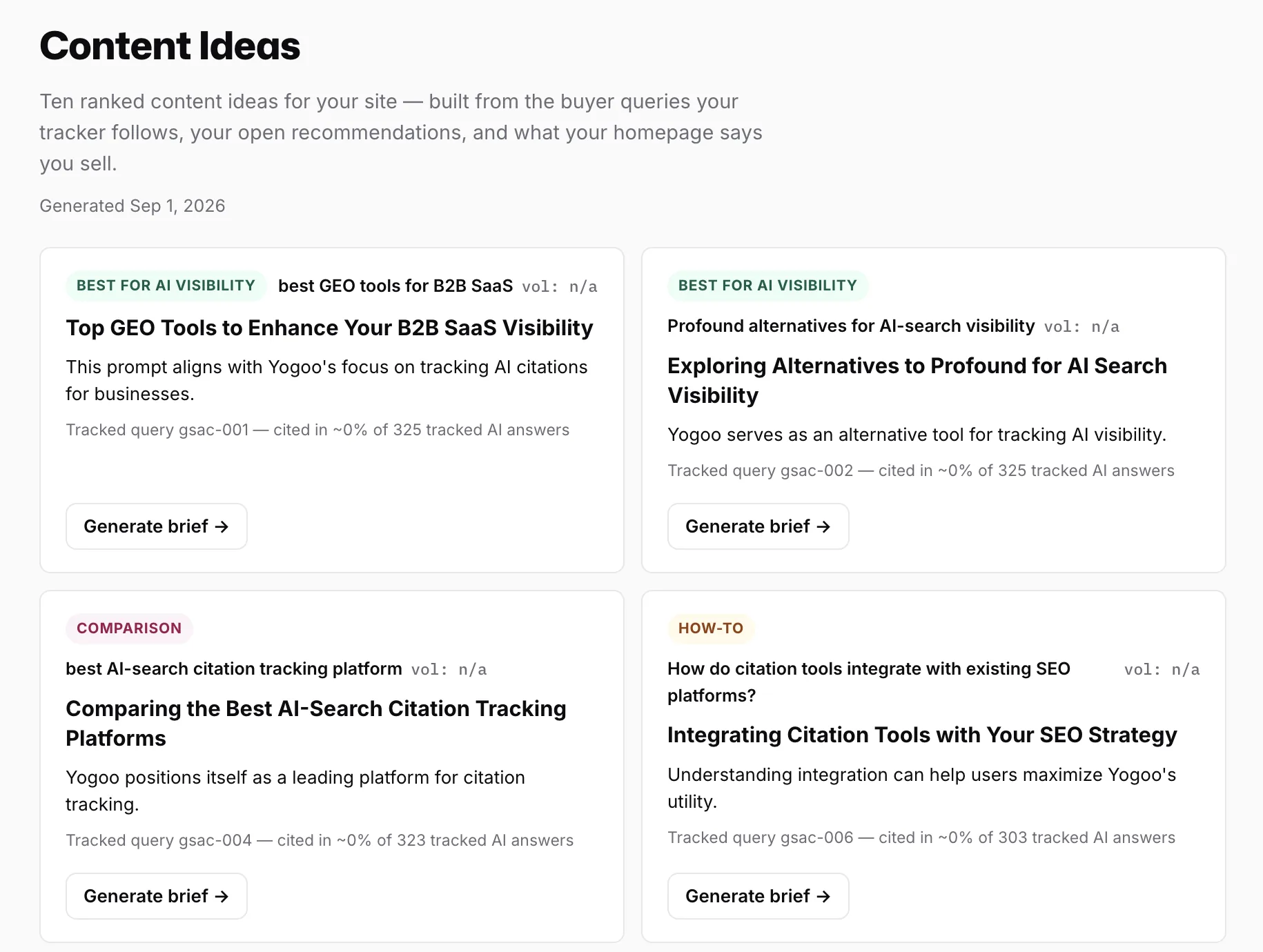
Content Ideas ranks topics using the buyer queries your tracker follows, your open recommendations, and what your homepage says you sell. Each one carries a tag like best for AI visibility or comparison, a suggested headline, a line on why it fits your brand, and the tracked query behind it. Some of these ideas sit at close to zero percent cited in tracked AI answers right now, which is exactly the gap the idea exists to close.
Hit Generate brief on any idea, and Yogoo AI expands it into a starting brief you can hand to a writer or finish yourself. Nothing gets published on your behalf. You still decide what to write, and once you’ve picked one, the next question is when it goes out, which is what the Content Calendar handles.
Where content ideas land on a calendar
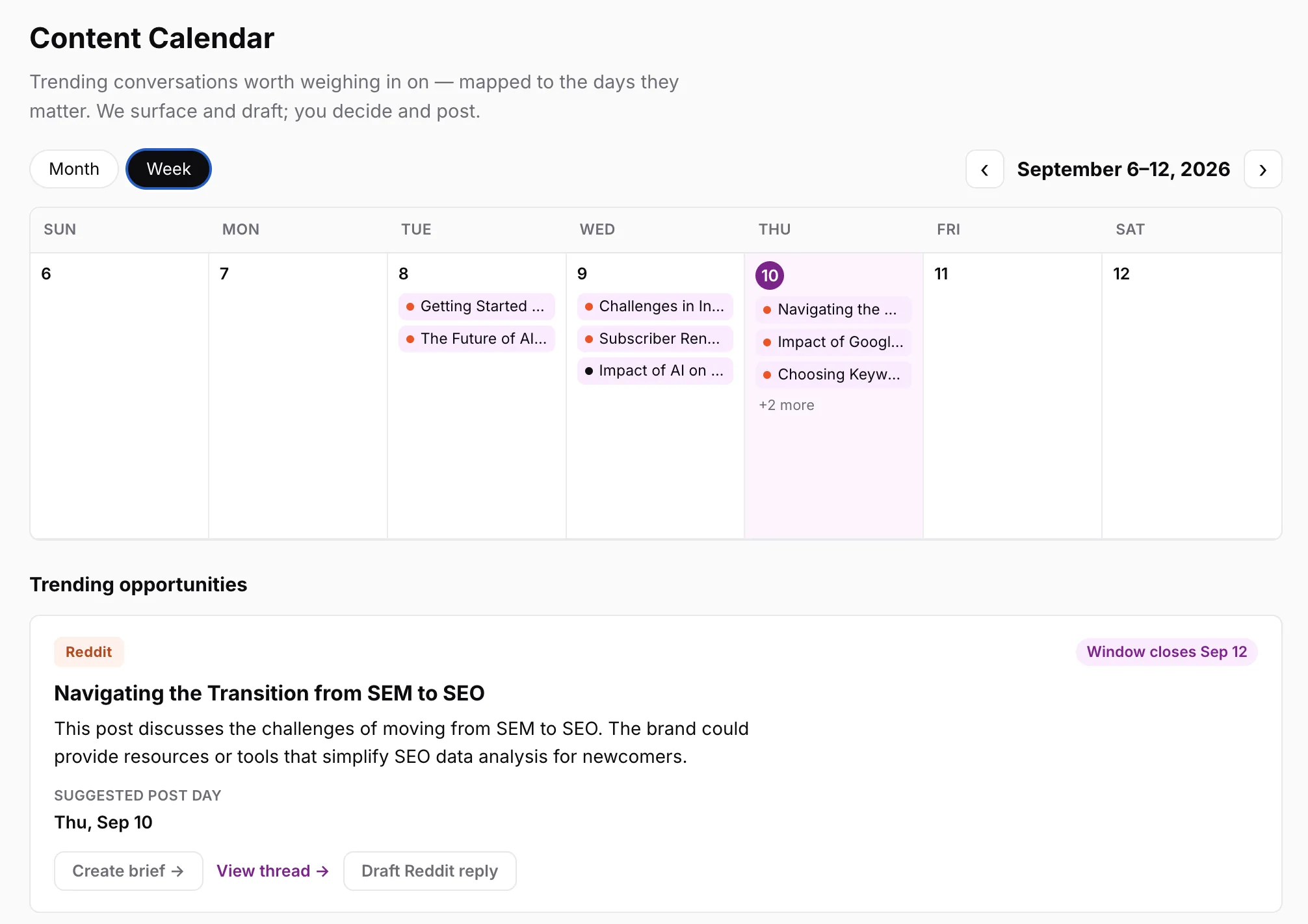
The Content Calendar takes those same trending conversations and maps them to actual days. Switch between month and week view to see what’s queued, open any day, and read the draft sitting behind it. Yogoo AI surfaces the idea and drafts it. You still decide whether it goes out.
Ideas and calendar slots pull from the same data, so an idea you’ve ranked in Content Ideas doesn’t have to sit in a separate list you forget to check. Once a day’s post is scheduled, drafting the actual copy comes next, and that’s Create Posts.
Turn one idea into posts for every channel you use
Create Posts turns an idea into something you can paste somewhere and post. Pick one or more: a Google Business Profile post, an Instagram caption, a Facebook, LinkedIn or X post, or a Reddit comment. Describe what the post should cover in a sentence or two, and Yogoo AI returns a ready-to-edit draft for each that you can review, fix what doesn’t sound right, and post yourself. Yogoo AI doesn’t post on your behalf.
Every draft coming out of this step leans on the same brand profile behind your content briefs, and that profile gets built in Brand Profile.
Reply to reviews in your own voice
Paste a review from Google, Yelp or any other site, pick a tone, and get a reply written as your business. Yogoo AI also drafts a short text or email asking customers for an honest review. It never writes reviews, and it never offers customers anything for one.
The brand profile behind every draft
Brand Profile keeps every draft sounding like your brand instead of a generic AI tool. Paste a handful of your existing posts or articles, and add your positioning, tone, writing rules, and key facts alongside them. Yogoo AI builds a fingerprint from all of it, and that fingerprint runs against every brief and every post draft that follows, not just the first one you generate.
Update the profile any time your style or positioning shifts. It feeds into every post and draft you generate after that.
How this connects to your Yogoo Score
Content Ideas, the Calendar, Create Posts, and Brand Profile all point at the same target: the buyer queries where ChatGPT, Claude, Perplexity, Gemini, and Google AI Overviews cite someone else instead of you. If you’re already working through your Recommendations queue, many of the content ideas here trace back to the same citation gaps. The difference is what comes out the other end: a fix to plan versus something you can draft and schedule the same day.
Every post you publish against one of those gaps is a chance to move your Yogoo Score, the same way closing a recommendation does. What that score actually measures is covered on its own page.